
Accelerate Success with AI-Powered Test Automation – Smarter, Faster, Flawless
Start free trial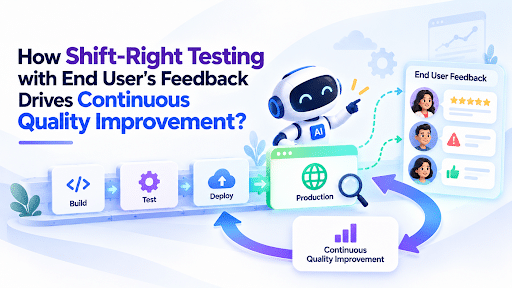
You try on a pair of shoes in the store. Perfect fit, great look, you walk a few laps around the shop and love them. Then you wear them to a wedding, and by 9 p.m. you’re carrying them in your hand.
The store test said “perfect.” Your feet said otherwise, and they had a lot more miles to judge.
That’s the gap between “all tests passed” and “customers are happy.” And it’s exactly the gap shift-right testing is built to close.
- Shift-right testing means continuing to check software quality after release, in the live environment, with real users and real traffic.
- End-user feedback is what turns that production data from “something is off” into “here’s what is off and why it hurts.”
- Together they create a loop: release small, listen closely, fix fast, and feed the lesson back into your pre-release tests.
- It doesn’t replace shift-left testing. It finishes the job shift-left starts.
So, what is shift-right testing in plain English?
Shift-right testing is the practice of testing and validating your software in production (or production-like conditions) instead of stopping at the release gate. It extends quality checks into real-world environments to see how your product behaves under real load, real devices, and real human weirdness.
Think of it this way. Shift-left is the crash-test lab: controlled, repeatable, and great at catching problems before the car leaves the factory. Shift-right is the actual road: potholes, rain, a guy cutting you off, and a driver who parks in ways no engineer imagined.
You need both. A car that only ever passed lab tests is a gamble. A car that only ever got tested on public roads is a lawsuit.
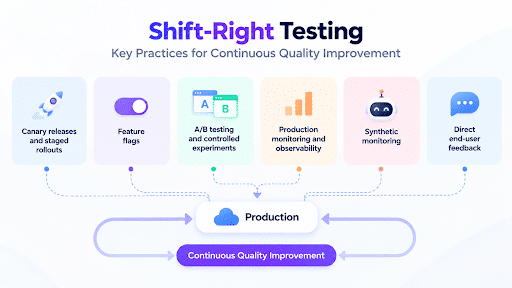
Shift-right usually shows up as things like:
- Canary releases and staged rollouts (new code goes to a tiny slice of users first)
- Feature flags (switch a feature off in seconds without redeploying)
- A/B testing and controlled experiments
- Production monitoring and observability
- Synthetic monitoring (bots that behave like users around the clock)
- And the one that gets skipped way too often: direct end-user feedback
Why “all tests passed” doesn’t mean “all good”
Here’s an uncomfortable truth: even the smartest teams are bad at predicting what users will actually like or tolerate.
At Microsoft, Ronny Kohavi and his team ran thousands of controlled experiments on Bing. The finding that humbled everyone: fewer than a third of ideas moved the metric they were designed to improve. Over at Airbnb, the numbers were even rougher. Out of 250 ideas tested on search, only 20 had a positive impact on key metrics.
These aren’t sloppy teams. These are some of the best product and engineering orgs on the planet. And their confident, well-reasoned ideas still missed most of the time.
Now think about what that means for your release. If experts can’t reliably guess what works, then no amount of pre-release testing can fully predict how real people will experience your product. The only way to know is to watch what happens when they actually use it.
Real users break things labs never will
Your test environment is a tidy apartment. Production is a house party at 2 a.m.
Real users bring slow networks, ancient phones, weird browser extensions, half-finished sign-ups, and behaviors nobody wrote a test case for. And they’re not patient about it. Google’s research on mobile speed found that 53% of mobile visits are abandoned when a page takes longer than three seconds to load. (That study dates to 2016, but the lesson hasn’t aged: people leave fast when something feels broken.)
Here’s the sneaky part. A page that loads in four seconds isn’t a failed test. Nothing crashed. No assertion went red. Your dashboard may show a green tick. But a real person already left.
And the stakes of getting this wrong keep climbing. The Consortium for Information & Software Quality estimated that poor software quality cost the US economy about $2.41 trillion in 2022. That’s not a typo, and it’s not just crashes. It includes security failures, technical debt, and the slow bleed of things that almost work.
And then there’s the loudest example of what happens when a change hits everyone at once. In July 2024, a faulty CrowdStrike update sent more than 8 million Windows systems into reboot loops. Part of the fix? A deployment ring process where updates pass through successive rings before going wide. In other words, they moved toward shift-right thinking: release to a few, watch, then expand.
Telemetry tells you what. Users tell you why.
Here’s where most shift-right conversations stop short.
Monitoring is brilliant at telling you that something changed. Error rates spiked. Latency crept up. Checkout conversions dipped on Android. Great. But dashboards can’t tell you that the “Continue” button looks disabled when it isn’t, or that your new onboarding flow feels like filling out a tax form.
That’s like checking the weather app instead of looking out the window. The app says 22°C and sunny. Meanwhile, you’re standing in the rain.
End-user feedback is the window. It fills in the human side:
- In-app prompts and micro-surveys: a one-tap “Was this helpful?” right after a key action
- Bug report buttons: with a screenshot and device info attached automatically
- Support tickets and chat logs: an unfiltered goldmine of what’s confusing people
- App store reviews and social mentions: public, brutal, and honest
- Beta and canary user groups: a small crowd that has agreed to tell you the truth early
Research backs up how valuable (and messy) this stuff is. A well-known study by Pagano and Maalej looked at over a million Apple App Store reviews and found that reviews mix bug reports, feature requests, and user experience comments, and that most feedback arrives shortly after a new release, then fades quickly.
Translate that: your listening window is short. If you aren’t ready to hear feedback in the first days after a release, you’ll miss the loudest signal you’ll ever get.
The feedback loop that actually improves quality
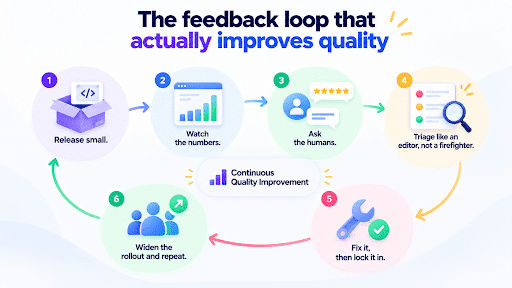
Continuous quality improvement isn’t one big move. It’s a loop you run again and again. Here’s how it works in practice.
1. Release small. Don’t hand the whole crowd a new feature at once. Use canary releases or feature flags to expose a small percentage of users first. If something’s off, the blast radius stays tiny.
2. Watch the numbers. Track error rates, response times, drop-offs, and conversion in that small group. This is your “something’s wrong” alarm.
3. Ask the humans. This is the step teams skip. While the numbers are coming in, collect feedback from the same group. A quick in-app question or a bug-report button works wonders. Now you’ve got the what and the why side by side.
4. Triage like an editor, not a firefighter. Not all feedback is equal. Group it by theme, match it with telemetry, and rank by how many users it hurts and how badly. One loud complaint isn’t a trend. Fifty quiet ones are.
5. Fix it, then lock it in. Here’s the move that turns this from a patch into a quality system: every real-world failure becomes a new automated test. The bug a user found in production is now a regression test that runs before every future release. That’s shift-right feeding shift-left.
6. Widen the rollout and repeat. When the small group is happy, expand. Then do it again with the next release.
That’s the whole thing. Each lap makes your pre-release tests smarter, because they’re being trained by real failures instead of your best guesses.
Common mistakes (so you can skip them)
Treating production like a fire alarm only. If you only look at production when something explodes, you’re doing incident response, not shift-right testing. The point is to learn continuously.
Collecting feedback with no context. Research keeps finding that users often submit vague feedback and leave out the details developers need. “It doesn’t work” is not a bug report. Capture screenshots, device info, and the steps leading up to the problem automatically so users don’t have to describe it.
Testing in production with no safety net. Shift-right isn’t “ship it and pray.” You need feature flags, easy rollbacks, and small rollouts so a bad release is an annoyance, not a headline.
Letting feedback die in a spreadsheet. If feedback doesn’t turn into tickets, fixes, and tests, you’ve built a very expensive suggestion box.
Skipping shift-left. Shift-right catches what slips through. It shouldn’t be catching what a basic unit test would have found. Shift-left keeps the front door tidy. Shift-right watches the back door.
How to get started this week
You don’t need a giant program. Start with something small and honest:
- Pick one high-traffic or high-risk user flow (sign-up, checkout, search).
- Add a simple feedback prompt or bug-report button to it.
- Roll your next change out to 5 to 10 percent of users using a feature flag.
- Compare what the metrics say with what users say.
- Turn the first real issue you find into an automated regression test.
That’s a working shift-right loop. Small, but real.
Where Webomates fits in
Here’s the practical headache: the more you learn from production, the more tests you have to write and maintain. And when your UI changes, brittle test scripts break, which makes teams hesitate to automate the lessons they just learned.
This is where Webomates comes in. Webomates CQ uses AI to generate your tests, and AiHealing keeps your scripts up to date when the UI changes, so what you learn from production becomes an automated test instead of another ticket sitting in a backlog. Its AI Defect Predictor helps sort real failures from false alarms, so your team chases real bugs and not noise.
The takeaway
Your test suite is trying the shoes on in the store. Useful, necessary, and not the final word. The real verdict comes at the wedding, around 9 p.m.
Shift-right testing, powered by end-user feedback, is how you hear that verdict early, while it’s still cheap to act on. Release small, listen hard, fix fast, and teach your tests what you learned. Do that on repeat, and quality stops being a gate you pass once and becomes something that keeps getting better.
Want to see how this would fit into your release process? Talk to someone from our sales team and bring your toughest recent production bug. Or if you’d rather poke around on your own, try Webomates CQ yourself.
FAQs
What is shift-right testing?
Shift-right testing is the practice of validating software quality after release, in production or production-like environments, using real users, real traffic, and real data. It complements shift-left testing, which catches issues earlier in development.
How is shift-right testing different from shift-left testing?
Shift-left testing moves testing earlier in the development cycle to catch defects before release. Shift-right testing extends testing into production to learn how the software behaves under real conditions. Shift-left prevents problems; shift-right detects what prevention couldn’t predict. Most strong teams use both.
Why is end-user feedback important in shift-right testing?
Monitoring tells you what changed (for example, errors or slower load times), but it can’t tell you how the experience felt. End-user feedback explains the why behind the numbers, surfaces usability problems that never trigger an error, and shows which issues actually matter to real people.
What are examples of shift-right testing techniques?
Common techniques include canary releases, feature flags, A/B testing, synthetic monitoring, production monitoring and observability, chaos engineering, and collecting user feedback through in-app surveys, bug-report tools, support tickets, and app reviews.
Is testing in production safe?
It can be, when it’s done with guardrails: small staged rollouts, feature flags to switch changes off instantly, solid monitoring, and quick rollback plans. The goal isn’t to take risks with users. It’s to limit risk by learning from a small group before releasing to everyone.
How does shift-right testing improve continuous quality?
It creates a loop. You release a change to a small group, collect telemetry and user feedback, fix what you find, and convert each real-world issue into an automated test that runs before future releases. Every cycle makes your testing smarter and your product steadier.
Can shift-right testing replace pre-release testing?
No. Shift-right works best alongside shift-left. Pre-release testing keeps obvious defects out of production, and shift-right catches the surprises that only real users and real conditions can reveal.

Ruchika Gupta, COO and Co-founder of Webomates, has 20+ years of experience in product delivery and global tech operations. She has held key roles at IBM, SeaChange, IPC Systems, Birlasoft, and served as President of Fonantrix Solutions. She writes about scaling operations, building strong delivery teams, and enabling smarter testing practices.
Tags: Continuous Quality Improvement, End-User Feedback, Production Testing, Quality Engineering, Regression Testing, Shift-Right Testing, Software Testing, Test Automation
Leave a Reply